
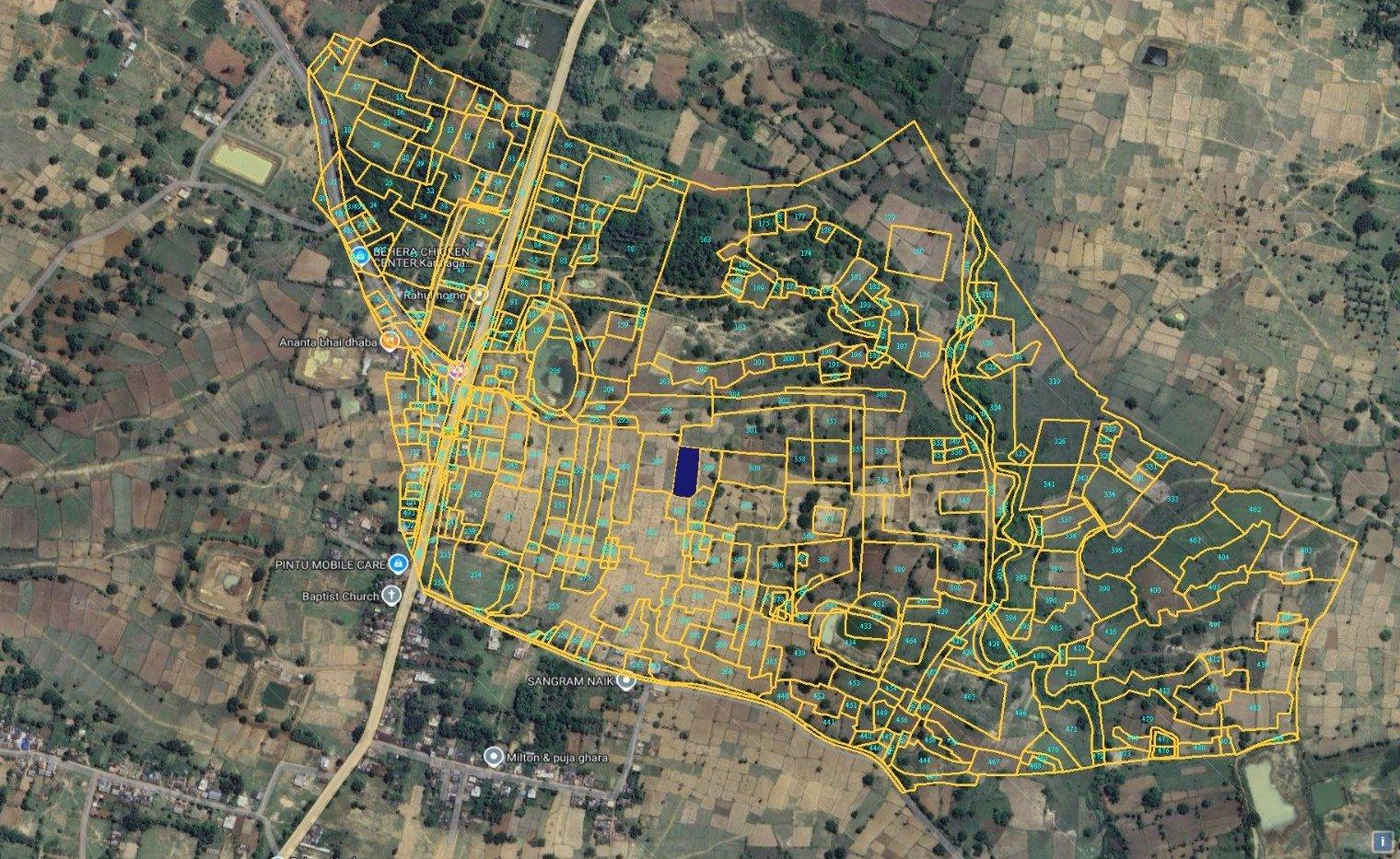
MeeBhoomi Adangal AP Village Map 2026 – Check Land Records Online
MeeBhoomi Adangal AP Village Map 2026 is a useful online resource for citizens of Andhra Pradesh who want to check their agricultural land records, Adangal details, ROR 1B records, survey numbers, and village maps. Through the MeeBhoomi portal, landowners can access important land-related information online without having to visit a government revenue office for every basic enquiry.
The MeeBhoomi Adangal Andhra Pradesh government introduced the MeeBhoomi online land records system to make land information more accessible and transparent. It helps farmers, landowners, buyers, and other citizens view available land records using details such as district, mandal, village, and survey number.
In this guide, you will learn how to check AP Adangal online, view the village map, search land records by survey number, understand ROR 1B, and access important land-related services in 2026.
What Is MeeBhoomi AP Portal?
MeeBhoomi is the Andhra Pradesh government’s online land records platform. It provides access to land-related information maintained by the state’s revenue administration.
The portal is designed to help citizens find information about agricultural land and property records through an online system. Easy Mehndi Design
Some of the important services associated with MeeBhoomi include:
- AP Adangal land records
- ROR 1B (Record of Rights)
- Village land records
- Survey number information
- Landowner details, where available
- Agricultural land information
- Electronic access to available land documents
- Links to related revenue services
Official website: MeeBhoomi Andhra Pradesh Portal
What Is Adangal in Andhra Pradesh?
Adangal is an important village-level land record maintained by Andhra Pradesh’s revenue department. It contains information about agricultural land, including cultivation and land-use details.
Farmers and landowners often use Adangal records to verify information about their agricultural properties.
An Adangal record may contain the following details:
- District name
- Mandal name
- Village name
- Survey number
- Sub-division number
- Land extent or area
- Land classification
- Cultivation details
- Crop-related information, where recorded
- Other available revenue information
Adangal is useful when checking agricultural land details, verifying recorded cultivation information, and handling certain land-related administrative procedures.
What Is AP Village Map?
An AP Village Map is a geographical representation of a village showing its boundaries, survey numbers, land parcels, and other mapped features, depending on the available cadastral map.
Village maps can help landowners understand the location and layout of agricultural land within a village.
They are particularly useful for:
- Identifying the location of a survey number.
- Understanding village boundaries.
- Checking the arrangement of agricultural land parcels.
- Understanding neighbouring survey numbers.
- Supporting preliminary land verification.
- Comparing mapped information with available land records.
MeeBhoomi Adangal A village map is not necessarily proof of legal ownership. To verify ownership, check the relevant official land records and obtain certified documents where required.
How to Check MeeBhoomi Adangal Online in 2026
You can check your MeeBhoomi Adangal Andhra Pradesh Adangal record online by selecting your district, mandal, and village on the MeeBhoomi website.
Follow these steps:
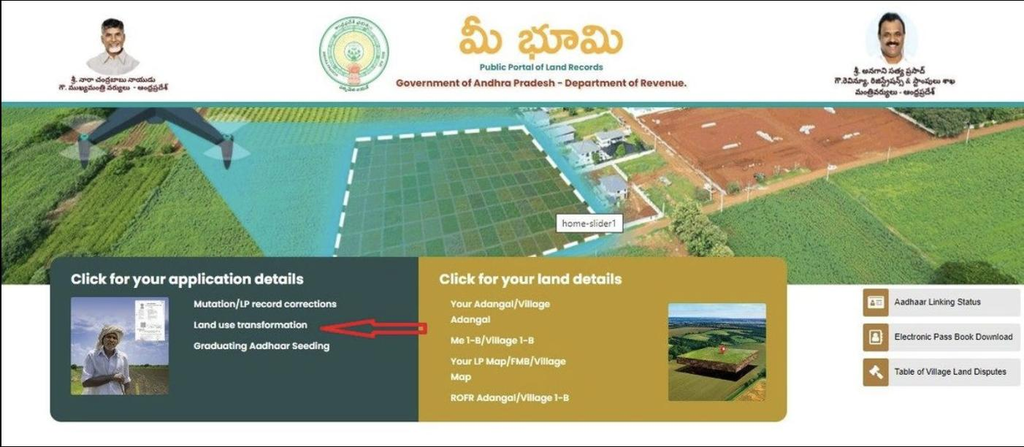
Step 1: Visit the official MeeBhoomi website
Open the official website:
Step 2: Select MeeBhoomi Adangal service
On the homepage, look for the Adangal option. Select one of the following options, depending on your requirement:
- Your Adangal – To check an individual land record.
- Village Adangal – To view available Adangal records for a village.
Step 3: Select your location
Choose the following details from the available dropdown menus:
- District
- Mandal
- Village
Make sure you select the correct revenue village.
Step 4: Enter your land details
Depending on the search option provided, enter the required information, such as your Khata number or other available identification details on MeeBhoomi Adangal.
Step 5: Enter the CAPTCHA code
Enter the security code displayed on the screen and click the submit or search button.
Step 6: View your Adangal record
Your available Adangal details should appear on the screen. Check the survey number, land extent, recorded land information, and other details carefully.
You may use the print option if it is available to save a copy for personal reference.
How to Check AP Village Adangal Online
If you want to view land records for an entire village instead of checking only one landowner’s record, you can use the Village Adangal option.
Follow these instructions:
- Visit the official MeeBhoomi AP website.
- Open the land records section.
- Select Your Adangal / Village Adangal.
- Choose your district.
- Select your mandal.
- Select your village.
- Choose the Village Adangal option.
- Complete the CAPTCHA verification.
- Click the submit button.
- View the available village land record information.
The displayed information depends on the records available in the portal. You can use it to check recorded agricultural land details and identify relevant survey information.
How to Check AP Village Map Online 2026
The AP Village Map service helps users view available cadastral land maps and survey information. On MeeBhoomi, look for the MeeBhoomi Adangal LP Map / FMB / Village Map service.
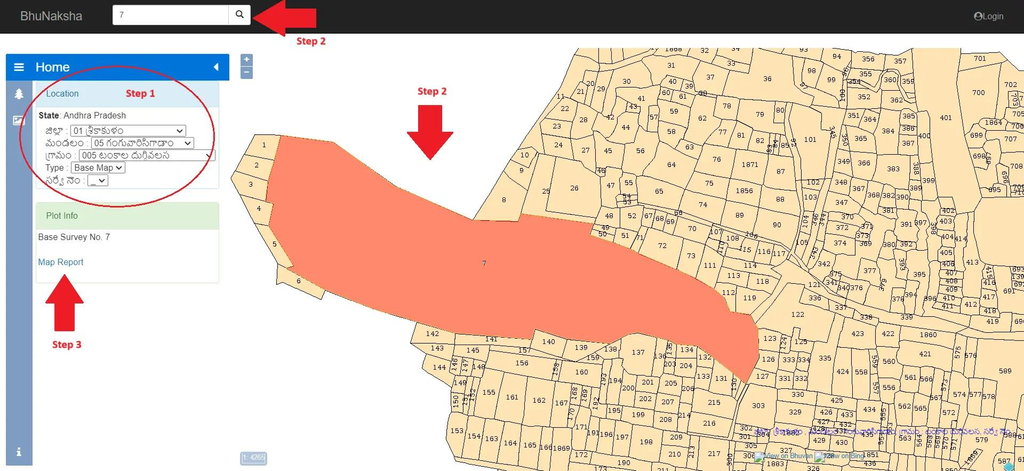
Follow these steps to check your village map online:
Step 1: Open MeeBhoomi Adangal AP Portal
Visit the official Andhra Pradesh land records website.
Step 2: Select LP Map / FMB / Village Map
Find the relevant option under the land details section.
Step 3: Choose your location
Select the following information:
- District name
- Mandal name
- Village name
Step 4: Select the map option
Choose the relevant option for an individual survey or Khata number, or the village map, depending on what you need.
Step 5: Enter the required details
If you select an individual survey or Khata search, enter the requested number.
Step 6: Complete CAPTCHA verification
Enter the CAPTCHA code displayed on the website.
Step 7: View your village map
Click the submit button to access the available map information.
You can examine the displayed survey numbers, land parcels, and mapped boundaries. If a print or download option is available, use it to save the map for reference.
Alternative official map resource: The Government of India’s land records directory also lists the Andhra Pradesh BhuNaksha service, MeeBhoomi Adangal.
How to Check AP ROR 1B Land Records Online
ROR 1B stands for Record of Rights (1-B). It is an important revenue document containing recorded landholding and pattadar information.
It is useful for checking the recorded details of agricultural land and comparing them with other land documents.
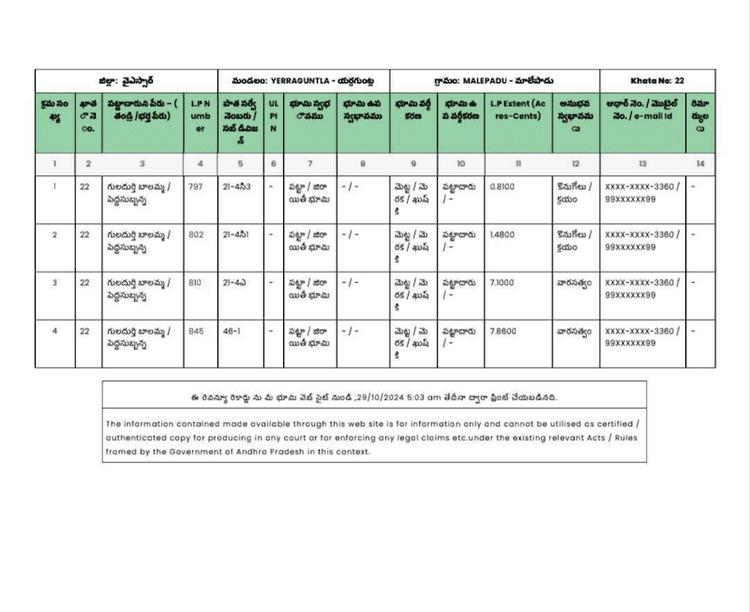
Steps to check ROR 1B:
- Visit the official MeeBhoomi website.
- Select the 1-B / Village 1-B option.
- Choose your district.
- Select your mandal.
- Choose your village.
- Select the available search method.
- Enter the required survey number, account number, or other requested details.
- Complete the CAPTCHA.
- Click the search or submit button.
- View the available ROR 1B information.
You should carefully check the pattadar name, account number, survey number, land extent, and other displayed information.
Difference Between Adangal and ROR 1B
Adangal and ROR 1B are two important land records in Andhra Pradesh. Although both contain land-related information, MeeBhoomi Adangal is different.
| Feature | Adangal | ROR 1B |
| Main purpose | Agricultural land details | Record of Rights |
| Land information | Cultivation and land use | Recorded landholding details |
| Survey number | Available where recorded | Available where recorded |
| Pattadar details | May be included | Important record field |
| Land extent | Yes | Yes |
| Main use | Agricultural and revenue verification | Landholding verification |
Important: Neither an online entry nor a map alone should be treated as conclusive proof of legal ownership. For property transactions or legal disputes, verify the relevant certified records and supporting documents.
How to Search AP Land Records by Survey Number
A survey number is one of the most useful details when searching for land information online.
If you know your survey number, you can use it to locate the corresponding land record where the selected service supports that search method.
Follow these steps:
- Open the MeeBhoomi AP website.
- Select the Adangal or ROR 1B service.
- Choose the district.
- Select the mandal.
- Select the village.
- Choose the Survey Number if available.
- Enter your survey number.
- Complete CAPTCHA verification.
- Submit your search.
- Check the returned land information.
Tip: If your land has a sub-division number, enter the complete number in the format requested by the portal. A small difference in the survey number can lead to an incorrect result.
How to Download or Print MeeBhoomi Adangal Land Records
After finding your Adangal or ROR 1B record, you may want to keep a copy for future reference.
Use these general steps:
- Open the required land record on MeeBhoomi.
- Check that the displayed details are correct.
- Look for the Print option, if available.
- Select Print.
- Choose Save as PDF in your browser’s print settings.
- Select the destination folder.
- Save the document.
For village maps, use the available map printing or download option if provided.
Remember that a downloaded online record may not be equivalent to a certified copy. If a bank, court, or government office requires an authenticated document, ask the relevant revenue office or MeeSeva centre about obtaining the required certified copy.
Other Important Services Available on MeeBhoomi Adangal AP Portal
Apart from Adangal, ROR 1B, and village maps, the MeeBhoomi platform is associated with several other land-related services.
Here are some useful services to know about:
| Service | Purpose |
| Adangal | Check agricultural land records |
| Village Adangal | View available village-level Adangal records |
| ROR 1B | Check recorded landholding information |
| Village 1B | Access village-level ROR information |
| LP Map / FMB | View field measurement and land maps |
| E-Passbook | Access available electronic passbook services |
| Aadhaar Linking | Check available Aadhaar seeding information |
| Land Conversion | Check land-use conversion information |
| Mutation | Access land record change-related services |
The availability of individual services and options may depend on the records and portal modules currently maintained by the department.
What Details Are Required to Check MeeBhoomi Adangal AP Land Records?
Before accessing the MeeBhoomi website, keep the following information ready.
- District name
- Mandal name
- Village name
- Survey number
- Khata or account number
- Pattadar name, if required
- CAPTCHA verification
You do not necessarily need every detail for every search. MeeBhoomi Adangal: The information required depends on the service and search method you select.
Benefits of MeeBhoomi AP Online Land Records
The MeeBhoomi portal makes accessing land information more convenient for Andhra Pradesh citizens.
Here are some major benefits:
1. Online access to land records
Landowners can check MeeBhoomi Adangal available Adangal and ROR 1B information online without making an initial visit to a revenue office.
2. Easy survey number verification
Users can search for available land information using survey numbers and other supported details.
3. Village map access
The LP Map and FMB services help users understand the mapped arrangement of land parcels.
4. Convenient record checking
Farmers can review available land information before approaching government offices for further services.
5. Improved transparency
Online access makes it easier to compare recorded information and identify possible discrepancies.
6. Useful for farmers and landowners
The portal helps citizens access important agricultural and revenue information.
Common Problems While Checking MeeBhoomi Land Records
Sometimes users may face difficulties when searching for MeeBhoomi Adangal, ROR 1B, or village maps.
Here are some common problems and possible solutions.
| Problem | Possible solution |
| Website not opening | Try again later or use another browser |
| CAPTCHA error | Enter the newly displayed CAPTCHA |
| Land record not found | Verify the district, mandal, and village |
| Incorrect survey number | Check the survey number and sub-division |
| Village map not loading | Refresh the page and try again |
| Incorrect pattadar details | Contact the relevant revenue office |
| Old land details displayed | Enquire about the latest record update |
What to Do If Your Land Details Are Incorrect?
If you find an incorrect name, survey number, land extent, or other information in your online record, do not ignore the discrepancy.
Follow these steps:
- Save or print the available record for reference.
- Compare the details with your registered sale deed and other land documents.
- Visit the relevant Village Revenue Officer or Tahsildar office.
- Explain the incorrect information.
- Submit the supporting documents requested by the revenue authorities.
- Follow the official correction or mutation procedure.
The correction process depends on the type of error and the applicable revenue rules.
More
Important Documents for Land Record Verification
If you are verifying agricultural land or preparing for a land-related transaction, MeeBhoomi Adangal, keep these documents available where applicable:
- Registered sale deed
- Previous ownership documents
- Adangal copy
- ROR 1B copy
- Pattadar passbook
- Survey number details
- Village map or FMB sketch
- Mutation proceedings, if applicable
- Relevant government-issued identification
The required documents can differ depending on the purpose of verification or application.
Important Tips Before Buying Agricultural Land in Andhra Pradesh
Checking MeeBhoomi Adangal and the village map is useful before purchasing agricultural property. However, buyers should not rely on only one online document.
Consider the following precautions:
- Verify the seller’s recorded landholding details.
- Check the Adangal and ROR 1B records.
- Compare the survey number with the registered sale deed.
- Verify the land extent and boundaries.
- Examine the FMB sketch or village map.
- Check the property’s registration history.
- Investigate any existing disputes or encumbrances.
- Confirm the property’s legal status with the appropriate authorities.
For important property transactions, consult a qualified property lawyer and obtain the necessary official records.
Frequently Asked Questions (FAQs)
What is MeeBhoomi Adangal AP?
MeeBhoomi is Andhra Pradesh’s online land records platform. It provides access to available land information, including Adangal, ROR 1B, and related village map services.
How can I check AP Adangal online in 2026?
Visit the official MeeBhoomi website, select the Adangal option, enter your district, mandal, and village details, provide the required search information, complete CAPTCHA verification, and submit your request.
How can I check the AP Village Map online?
Visit the MeeBhoomi Adangal portal and select the LP Map / FMB / Village Map service. Choose your district, mandal, and village, provide the requested details, and submit the search.
Can I check AP land records using a survey number?
Yes. You can use the survey number to search for land information in services that support survey-number-based searches.
What is the difference between Adangal and 1B?
Adangal mainly contains agricultural land and cultivation-related information, while ROR 1B contains recorded landholding and pattadar information.
Can I download MeeBhoomi Adangal online?
You can print or save the displayed record as a PDF when the portal provides a print option. Check with the revenue department if you need a certified copy.
Is MeeBhoomi available for all Andhra Pradesh districts?
The portal is intended for Andhra Pradesh land records. However, availability of specific records depends on the relevant village and the department’s digitized data.
What is FMB in AP land records?
FMB stands for Field Measurement Book. It contains survey-related measurements and sketches used to identify land parcels and their boundaries.
What should I do if my land details are incorrect?
Compare the online details with your supporting land documents and contact the relevant Tahsildar or revenue office to understand the official correction procedure.
Can I check the entire village land records online?
You can use options such as Village Adangal or Village 1B, where available, to access village-level land record information.
Is the MeeBhoomi online record sufficient for legal ownership verification?
An online record is useful for preliminary verification, but it should not be treated as conclusive proof of ownership. Verify certified revenue records, registration documents, and other relevant legal documents.
Conclusion
The MeeBhoomi Adangal AP Village Map 2026 service makes it easier for Andhra Pradesh citizens to access important agricultural land records online. Whether you want to check Adangal, view ROR 1B, search by survey number, or examine an available village map, the MeeBhoomi portal provides a convenient starting point.
Before using any land record for property transactions or official purposes, MeeBhoomi Adangal carefully verify the information and obtain certified documents whenever necessary.
Always use the official government website to access your land information and avoid sharing personal or land-related details with unknown websites.
Reference sources: Andhra Pradesh district administration and land records resources, the Government of India’s Digital India Land Records Modernization Programme, and published MeeBhoomi service guides.

From stylish Front- and back-hand mehndi designs to simple, modern palm mehndi patterns, this space celebrates creativity.